On February 24, 2025, Anthropic launched Claude Code as a research preview — a terminal-based AI coding assistant. By March 2026, its GitHub repository had accumulated over 85,000 stars (github.com/anthropics/claude-code, checked March 31, 2026). Anthropic reported a 5.5x revenue increase tied to Claude Code by July 2025, as documented in the Pragmatic Engineer newsletter's "How Claude Code is Built" coverage. At the "Code with Claude" developer conference in San Francisco on May 22, 2025, Claude Code was made generally available alongside the announcement of Claude 4 Opus and Sonnet (source: anthropic.com/news/Introducing-code-with-claude).
These numbers tell one story. The source code tells a different, more interesting one.
We performed a complete analysis of Claude Code's source tree at src/, examining 1,902 TypeScript and TSX files totaling 513,237 lines — 398,000 lines of code, 82,000 lines of comments, and 33,000 blank lines. Anthropic's founding engineers have stated that approximately 90% of this code was written by Claude itself (source: Pragmatic Engineer interview with the Claude Code team, 2025. Exact methodology for this metric is not published; it likely reflects git blame attribution rather than a formal measurement).
This article is a technical reference, not a product review. Every claim is grounded in specific source files, type definitions, and architectural patterns observable in the codebase. Where we lack data — particularly around evaluation metrics and benchmarks, which are not present in the source — we say so explicitly rather than speculate.
What follows is an analysis of how Anthropic engineers the "harness" — the infrastructure that transforms a language model from a text predictor into a reliable, safe, and capable coding agent.
The distinction between a language model and an agentic coding tool is the harness. The model generates text; the harness decides what the model sees (context management), what the model can do (tool system), whether the model is allowed to do it (permission architecture), and how multiple model instances coordinate (agent orchestration).
In Claude Code, this harness spans five architectural layers. First, entry points in src/entrypoints/ handle five execution modes — CLI, MCP server, Agent SDK, Bridge (remote), and Daemon — all converging through a memoized init.ts that handles configuration, authentication, telemetry, OAuth, and LSP server management. Second, state management in src/state/ implements a Zustand-like store with selector-based subscriptions, backed by a 1,758-line bootstrap singleton (src/bootstrap/state.ts) that tracks session metadata, API costs, agent state, plugin state, trust state, and slow-operation timers for the developer toolbar. Third, the query engine in src/query/ manages the agentic loop — from context building through API calls to tool dispatch. Fourth, the tool and permission system in src/tools/ and src/utils/permissions/ gates every action the model attempts. Fifth, the agent orchestration layer in src/coordinator/ and src/tasks/ manages multi-agent workflows.

REPL.tsx, at 896 kilobytes, is the largest single file in the codebase. It serves as the main interactive loop, orchestrating FullscreenLayout, VirtualMessageList (149KB, implementing virtual scrolling with sticky-to-bottom and intersection observers), PromptInput (355KB, integrating command history, slash commands, model selection, voice input, and vim mode), and the modal system. The fact that this file is nearly a megabyte of TypeScript is not a code quality problem — it reflects the genuine complexity of coordinating dozens of interactive subsystems in real time.
Claude Code runs on Bun, not Node.js. The choice was made for build performance — Bun's bundler with feature gates (bun:bundle) enables dead code elimination at compile time, conditional module loading, and startup fast paths. The --version flag returns without loading a single module. Feature gates like COORDINATOR_MODE, BASH_CLASSIFIER, and DAEMON control which code paths are included in any given build.
The rendering pipeline deserves a section of its own. Among CLI tools we have examined — including Warp (Rust-native GPU rendering), Fig (now acquired by AWS), Charm's Bubbletea (Go TUI framework), and standard Ink-based tools — Claude Code's approach is unique in implementing a full browser-engine-style rendering pipeline within a terminal context. Claude Code's terminal UI is not built on standard Ink — it is a custom fork with deep modifications to the rendering pipeline.
The pipeline proceeds in seven stages: React component rendering, reconciliation through a custom React reconciler (src/ink/reconciler.ts) that bridges React's component tree to Ink's DOM model, layout computation via Yoga WASM — Meta's open-source constraint-based flexbox engine adapted with a custom LayoutNode interface, rendering to an output buffer via renderNodeToOutput (src/ink/render-node-to-output.ts, at 63 kilobytes the most complex file in the ink/ directory), screen buffer operations through CharPool string interning and StylePool ANSI code interning, frame diffing with renderAdaptive() that computes only changed cells, and finally ANSI code emission to the terminal.
The frame scheduler runs at 16ms intervals — approximately 60fps. Frames are double-buffered through frontFrame/backFrame swapping. The renderer implements DECSTBM hardware scrolling, using terminal scroll regions (SU/SD escape sequences) instead of full screen redraws. Viewport culling ensures only visible ScrollBox content is rendered. An adaptive scroll draining algorithm applies different strategies per terminal: native draining for iTerm2/Ghostty (proportional at roughly three-quarters per frame) and adaptive step draining for xterm.js in VS Code.
The DOM model supports nodes of type ink-box, ink-text, ink-root, ink-link, and ink-progress, each with Yoga layout nodes, event handlers following a W3C DOM Level 3 event model (capture, at-target, bubble phases), and a focus management system. Mouse tracking uses mode 1003. The Kitty keyboard protocol is supported. OSC 8 hyperlinks allow clickable URLs in the terminal.
Concrete numbers: App.tsx (98KB), the root Ink component, handles stdin/stdout context, keyboard input parsing, multi-click detection, and error boundaries. ScrollBox.tsx (32KB) implements imperative scroll APIs — scrollTo, scrollBy, scrollToElement — bypassing React for zero-latency scrolling. Text.tsx (17KB) handles styled text with color, bold, italic, underline, and reverse attributes. Button.tsx (17KB) provides clickable elements with focus and hover states.
The rendering optimizations include double buffering, viewport culling, damage tracking through layoutShifted flags achieving O(changes) rather than O(rows times columns) complexity, character string interning through CharPool for reduced memory and comparison overhead, style code interning through StylePool, DECSTBM hardware scrolling, virtual scrolling, blit optimization for unchanged rectangular regions, and throttled rendering at 16ms intervals.

Claude Code defines 38 tools across 9 categories, registered through a factory pattern in src/Tool.ts. The buildTool() function (lines 757-792) merges a ToolDef with explicit defaults — and here is a critical architectural detail: the factory defaults are permissive, not restrictive. TOOL_DEFAULTS.checkPermissions returns allow; TOOL_DEFAULTS.isEnabled returns true. Individual tools are expected to override these with stricter checks. This inverts the common assumption: security is achieved through tool-specific overrides rather than framework-level deny-by-default. Each tool definition carries a comprehensive interface:
The ToolDef interface includes name, async description and prompt functions (both accepting context), inputSchema and outputSchema (Zod), a call method returning Promise of data, checkPermissions returning a PermissionDecision (allow, ask, deny, or passthrough), validateInput, userFacingName, isConcurrencySafe and isReadOnly boolean methods, an optional shouldDefer flag, renderToolUseMessage and renderToolResultMessage for React UI, and maxResultSizeChars for output truncation.
Tool execution follows an eight-step lifecycle — and crucially, hooks are integrated directly into the pipeline, not bolted on afterward. Step 1: the model emits a tool_use block. Step 2: validateInput runs against the Zod schema. Step 3: PreToolUse hooks fire — these can return a permissionDecision (allow, deny, or ask), modify the tool's input via updatedInput, inject additionalContext, or block execution entirely. Step 4: checkPermissions evaluates the permission decision, incorporating hook results. Step 5: if the behavior is "ask," a permission dialog is shown. Step 6: the tool's call method executes. Step 7: PostToolUse hooks fire, which can modify MCP output or perform cleanup. Step 8: the result is mapped to a ToolResultBlockParam. Results exceeding maxResultSizeChars are persisted to disk with a truncated preview and file path embedded in the response. A critical security property: a hook returning "allow" does NOT override a deny rule — deny rules always win.
The tool orchestration layer (src/services/tools/) includes toolOrchestration.ts for batching and concurrency management, toolExecution.ts for single-tool lifecycle, StreamingToolExecutor.ts for streaming output, and toolHooks.ts for lifecycle hooks that fire before and after tool execution.
BashTool (src/tools/BashTool/BashTool.tsx) is the highest-risk tool in the system — it is the only tool that can execute arbitrary shell commands on the user's machine, making its security surface uniquely broad compared to file or search tools. It performs AST-level parsing of shell commands through a full bash parser (src/utils/bash/bashParser.ts, ast.ts) with command specifications (CommandSpec type with subcommands, arguments, options) loaded from Fig autocompletion specs via loadFigSpec(). The security analysis in bashSecurity.ts defines 23 distinct violation types, each with a numeric ID: INCOMPLETE_COMMANDS (1), JQ_SYSTEM_FUNCTION (2), JQ_FILE_ARGUMENTS (3), OBFUSCATED_FLAGS (4), SHELL_METACHARACTERS (5), DANGEROUS_VARIABLES (6), NEWLINES (7), three variants of DANGEROUS_PATTERNS for command substitution and I/O redirection (8-10), IFS_INJECTION (11), GIT_COMMIT_SUBSTITUTION (12), PROC_ENVIRON_ACCESS (13), MALFORMED_TOKEN_INJECTION (14), and nine more covering backslash escapes, brace expansion, control characters, Unicode whitespace, zsh-specific dangerous commands, and comment-quote desync. For zsh specifically, 18 commands are blocked: zmodload, emulate, sysopen, sysread, syswrite, zpty, ztcp, zsocket, mapfile, and zf_* filesystem wrappers. This is not a blocklist — it is a structured taxonomy of shell injection vectors.
The permission system (src/utils/permissions/) operates through multiple evaluation layers. Permission modes include default (prompt for everything), plan (read-only with narrated execution), acceptEdits (auto-approve file changes), bypassPermissions (trust all), dontAsk (suppress prompts), and autoModeAcceptAll (classifier-driven).
Remote task types extend beyond basic agent execution: the REMOTE_TASK_TYPES union includes remote-agent, ultraplan, ultrareview, autofix-pr, and background-pr — each with a pluggable completion checker registered via registerCompletionChecker(). This extensibility pattern allows different completion logic per task type without modifying the core task infrastructure.
The bash classifier (bashClassifier.ts) — available only internally — returns a ClassifierResult with confidence levels (high, medium, low) indicating the danger level of a command. The classifyBashCommand() function performs semantic analysis beyond regex matching: it understands that "rm -rf /tmp/build" is different from "rm -rf /" not just syntactically but contextually.
Path-level permissions (pathValidation.ts, filesystem.ts) distinguish read access (checkReadPermissionForTool) from write access (checkWritePermissionForTool), with different rules for project directories versus system paths. A bypass permissions killswitch (bypassPermissionsKillswitch.ts) provides emergency override capability. Dangerous pattern detection (dangerousPatterns.ts) supplements the classifier with known-bad patterns, and denial tracking (denialTracking.ts) records which operations were blocked for audit purposes.
Permission decisions flow through a defined pipeline: configuration rules (alwaysAllow, alwaysDeny, alwaysAsk from settings.json), classifier evaluation (for auto mode — with a critical implementation detail: the speculative classifier check races against a 2-second timeout; if the classifier has not returned in 2 seconds, the system falls through to an interactive prompt rather than blocking indefinitely), interactive user prompts with UI dialogs, and coordinator handlers for multi-agent permission delegation.

At the center of the agentic loop sits QueryEngine (src/QueryEngine.ts), the conversation lifecycle container. One QueryEngine instance exists per conversation, owning persistent state across turns: the message history, a file cache, usage tracking, and the streaming interface. Its configuration type (QueryEngineConfig, lines 130-173) exposes maxTurns, maxBudgetUsd, taskBudget, fallbackModel, thinkingConfig, and snipReplay — each controlling a different aspect of how the conversation unfolds. The query loop itself implements diminishing returns detection: a DIMINISHING_THRESHOLD of 500 tokens and a COMPLETION_THRESHOLD of 0.9 (90%) mean that if 3 or more consecutive continuations each produce fewer than 500 additional tokens, the system infers the model is stuck and stops the loop. This prevents infinite repetition loops that would burn tokens without progress.
Tool orchestration (src/services/tools/toolOrchestration.ts) partitions consecutive tool calls by concurrency safety. The canExecuteTool() function checks whether a tool is concurrency-safe; only when ALL currently executing tools are concurrency-safe does the system batch them for parallel execution. A single non-concurrent-safe tool gets exclusive execution. The default maximum concurrency is 10, configurable via the CLAUDE_CODE_MAX_TOOL_USE_CONCURRENCY environment variable.
The context management system determines what the model sees in its context window. In our assessment, this is the engineering problem with the highest impact on output quality — more than model selection, more than tool design — because an agent with perfect tools but wrong context will produce wrong actions. Anthropic's own best practices documentation (code.claude.com/docs/en/best-practices) identifies context management as the single biggest lever, stating that "Claude's context window fills up fast, and performance degrades as it fills." Claude Code approaches this through several subsystems.
Context is built through a three-layer pipeline. Layer 1: getUserContext() — memoized, loads CLAUDE.md files and user preferences. Layer 2: getSystemContext() — also memoized, injects git status (truncated to 2,000 characters) and cache breakers. Layer 3: fetchSystemPromptParts() — fetches system prompt sections in parallel. This memoization-plus-parallel-fetch strategy minimizes redundant computation while ensuring context freshness.
System prompt construction (src/constants/prompts.ts, 54 kilobytes) uses section-based composition. The getSystemPrompt() function assembles prompts from modular sections, enabling A/B testing and conditional inclusion based on feature gates. CLAUDE.md loading (src/utils/claudemd.ts, 46KB) processes instruction files, and auto-memory integration from the memory directory (src/memdir/) is capped at 200 lines or 25 kilobytes in MEMORY.md — a dual-limit that prevents memory from consuming excessive context.
The query loop itself implements four compression stages before each API call: snip compacting (removing superseded messages), micro-compact (per-response compression), context collapse (folding verbose tool results), and auto-compact triggering (when context approaches budget limits). These stages execute in sequence — each reducing the token count before the next evaluation — creating a multi-pass compression pipeline that balances context quality against budget pressure.
The compression service (src/services/compact/) implements three levels: session-level compact triggered manually or automatically (autoCompact.ts with threshold-based triggering), API-level micro-compact for individual responses (microCompact.ts), and session memory compact for cross-session persistence (sessionMemoryCompact.ts). Messages are grouped for compression (grouping.ts), and a time-based configuration system (timeBasedMCConfig.ts) adjusts compression aggressiveness based on session duration.
Memory extraction (src/services/extractMemories/) runs as a forked subprocess — a child agent process that analyzes the conversation transcript and writes persistent memories to the auto-memory directory. This fork pattern isolates the memory extraction from the main conversation flow, preventing it from consuming the user's context budget.
Token budget management (src/utils/tokenBudget.ts, tokens.ts) accumulates input and output token counts across turns, enforces hard limits, and informs the query loop's continuation decisions. Context analysis (src/utils/analyzeContext.ts) provides detailed token counting for diagnostics.
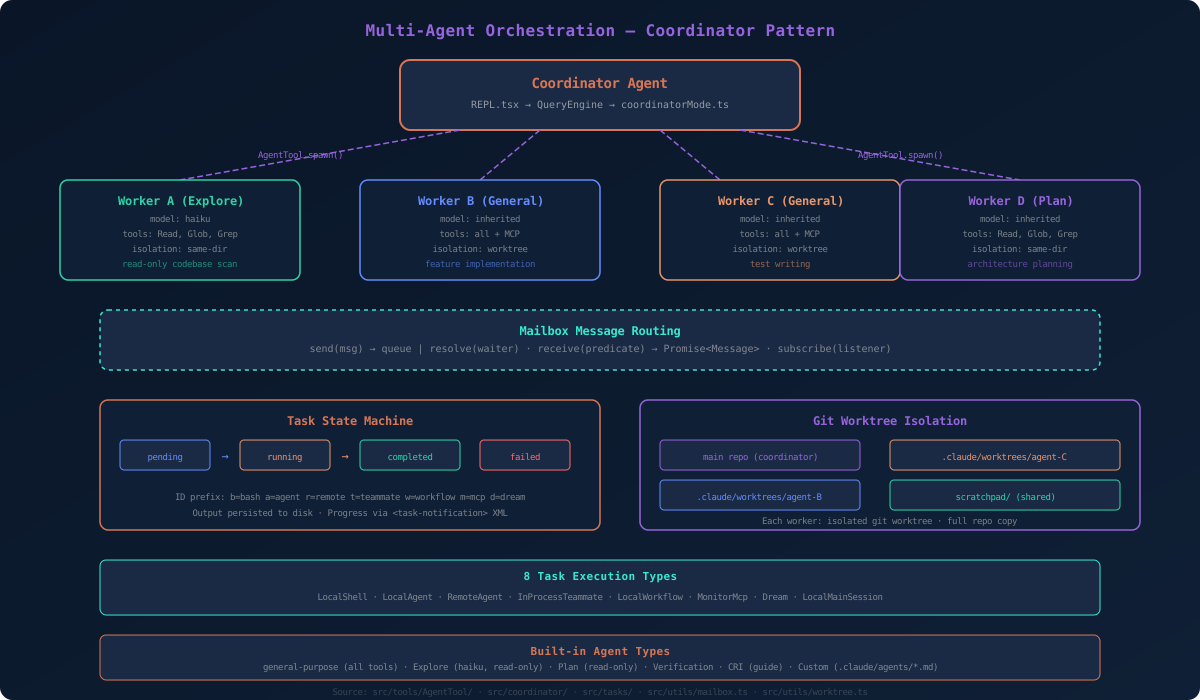
The multi-agent system is Claude Code's most architecturally complex subsystem, measured by the number of distinct execution modes (5), task types (8), and cross-cutting concerns (worktree isolation, permission delegation, message routing, progress tracking). By comparison, Cursor's agent system operates within a single process with sequential tool execution, and GitHub Copilot Workspace uses a cloud-orchestrated pipeline rather than local multi-agent coordination. Claude Code enables a single instance to orchestrate multiple parallel workers, each with isolated execution environments and coordinated communication.
Agent spawning occurs through AgentTool (src/tools/AgentTool/AgentTool.tsx), which accepts parameters including description, prompt, subagent_type (built-in or custom), model override, run_in_background flag, isolation mode (worktree for git-level isolation), working directory, and team_name.
Five built-in agent types serve different roles: general-purpose agents have access to all tools and inherit the parent model; Explore agents use Haiku for speed, are restricted to read-only tools (Read, Glob, Grep), and specialize in fast codebase scanning; Plan agents are read-only with the parent model, designed for architecture planning; Verification agents focus on testing; and CRI (Claude Code guide) agents provide documentation assistance. Custom agents are defined as Markdown files with YAML frontmatter in .claude/agents/, specifying tools, disallowedTools, model, permissionMode, maxTurns, skills, mcpServers, hooks, memory settings, and isolation preferences.
Coordinator mode (src/coordinator/coordinatorMode.ts) transforms the main Claude instance into an orchestrator. When CLAUDE_CODE_COORDINATOR_MODE is active, the coordinator's system prompt is augmented with specific instructions for spawning workers (via AgentTool), continuing workers (via SendMessage), and stopping workers (via TaskStop). Worker results flow back as task-notification XML blocks. A scratchpad directory enables cross-worker knowledge persistence.
A subtlety of agent spawning deserves attention: the fork subagent path (src/tools/AgentTool/forkSubagent.ts). When the fork experiment is active and no explicit subagent_type is specified, the system forks the parent conversation into a child agent. The key optimization: all fork children use byte-identical placeholder text ("Fork started — processing in background") for every tool_result block, with only the final directive text differing per child. This is a deliberate prompt cache optimization — because Anthropic's API caches prompt prefixes, byte-identical placeholders across siblings ensure maximum cache hits, dramatically reducing latency and cost for parallel fork operations. A recursive fork guard (isInForkChild) checks both the querySource field and message history for a FORK_BOILERPLATE_TAG to prevent infinite recursion.
The StreamingToolExecutor (src/services/tools/StreamingToolExecutor.ts) manages tool interruption with two behaviors: tools declaring interruptBehavior() as "cancel" are stopped immediately when the user types a new message or presses ESC, while tools returning "block" (the default) continue running to completion. A sibling abort controller cascades errors: if a BashTool execution fails, the siblingAbortController fires, canceling all concurrently running tools. This prevents wasted work when one tool in a batch encounters a fatal error.
Workers can be isolated through git worktrees (src/utils/worktree.ts), creating separate repository copies at .claude/worktrees/. This means workers can make file changes, create branches, and run builds without affecting the main repository or each other. The worktree is automatically cleaned up on task termination, unless the worker's changes should be preserved.
The task system (src/tasks/) defines eight execution types through a discriminated union: LocalShellTask for bash/powershell execution, LocalAgentTask for local Claude subprocesses, RemoteAgentTask for cloud-hosted agents via CCR (Claude Code Remote), InProcessTeammateTask for same-process team members in swarm mode, LocalWorkflowTask for task chains, MonitorMcpTask for MCP server supervision, DreamTask for background imagination and consolidation, and LocalMainSessionTask for the main REPL session.
Task IDs use type prefixes for identification: b for bash, a for agent, r for remote, t for teammate, w for workflow, m for monitor, d for dream. The ID suffix is generated from 8 random bytes mapped to a 36-character alphabet (0-9a-z), yielding a combinatorial space of 36 to the 8th power — approximately 2.8 trillion possible IDs, resistant to brute-force enumeration. Task state follows a state machine: pending, running, completed, failed, or killed. An atomic notification pattern (enqueueAgentNotification) uses a check-and-set on a notified flag to prevent duplicate notifications — a real-world concurrency guard. Output is persisted to disk, and progress updates flow through task-notification XML to the coordinator.
The Mailbox class (src/utils/mailbox.ts) is the message routing primitive for inter-agent communication. Its interface is minimal: send(msg) either stores the message in an internal queue or resolves a waiting promise if a receiver is already listening. receive(predicate) returns a Promise that resolves when a message matching the predicate function arrives. subscribe(listener) provides a pub/sub pattern for continuous message monitoring.
This design trades distributed system scalability for local debuggability — a deliberate choice for a developer tool where every message is traceable and every failure is diagnosable.
Memory management is a practical concern for multi-agent systems. In-process teammate messages are capped at TEAMMATE_MESSAGES_UI_CAP = 50 to prevent RSS memory bloat — BQ analysis at Anthropic showed approximately 20MB RSS per agent at 500+ turn sessions, with peak observations of 36.8GB in a session with 292 concurrent agents. The appendCappedMessage utility implements a sliding window that keeps only the most recent 50 messages per teammate. Pending messages sent via SendMessage are queued mid-turn and drained at tool-round boundaries via drainPendingMessages(), preventing message loss during active computation.
The swarm subsystem (src/utils/swarm/) extends multi-agent to sustained team-based parallelism. Constants define the team lead name and session name. The system includes in-process runner for embedded execution, permission bridges for delegating permissions from the coordinator to workers, and layout managers for terminal panel arrangement. Backends include TmuxBackend for tmux-based session management, ITermBackend for iTerm2 integration, and InProcessBackend for embedded execution.
The Model Context Protocol integration (src/services/mcp/) is, by transport count and feature scope, the most comprehensive MCP client implementation we have examined — compared to Cursor's MCP support (stdio + SSE), Continue.dev's implementation (stdio), and the reference TypeScript MCP client from modelcontextprotocol.io (stdio + SSE). The MCP ecosystem has grown to over 8 million SDK downloads with 300+ integrations (source: modelcontextprotocol.io usage statistics and Anthropic's MCP documentation at code.claude.com/docs/en/mcp, as of early 2026).
The MCP client (src/services/mcp/client.ts) supports multiple transport types: stdio for local process communication, SSE (Server-Sent Events) for unidirectional streaming, HTTP for request/response, WebSocket for bidirectional real-time, and SDK and IDE-native transports for embedded scenarios. Connections follow a state machine: Pending, Connected, Failed, NeedsAuth, or Disabled.

MCP servers can be scoped to local (project-specific, stored in .claude.json), user (~/.claude.json), dynamic (runtime-added), enterprise (organization-wide), or managed contexts. Tool names are normalized to handle namespace collisions — when multiple MCP servers expose tools with the same name, the system prefixes them as mcp__servername__toolname.
The tool search feature (ToolSearchTool) implements deferred tool loading: only tool names consume context at session start. Full tool definitions are loaded on demand when the model actually needs them. This is critical for context efficiency — adding more MCP servers has minimal context window impact.
A practical race condition mitigation: before spawning an agent that requires MCP servers, the system polls for up to 30 seconds (MAX_WAIT_MS = 30,000, POLL_INTERVAL_MS = 500) waiting for MCP servers to reach Connected state. This ensures agents don't start executing before their tools are ready — a real-world concurrency problem that would otherwise cause silent failures.
OAuth authentication (src/services/oauth/) supports PKCE flows, device code flows (used for terminal-based authentication), and cross-app access (XAA) for enterprise deployments. The MCP authentication handler (elicitationHandler.ts) manages credential collection through dynamically generated forms based on tool input schemas.
The hooks system provides deterministic shell command execution at specific lifecycle events — unlike CLAUDE.md instructions which are advisory (the model may or may not follow them), hooks guarantee execution.
Hook events include SessionStart, UserPromptSubmit, PreToolUse, PostToolUse, PostToolUseFailure, PermissionRequest, SubagentStart, SubagentStop, Stop, StopFailure, Notification, TaskCreated, TaskCompleted, TeammateIdle, InstructionsLoaded, ConfigChange, CwdChanged, FileChanged, WorktreeCreate, WorktreeRemove, PreCompact, PostCompact, Elicitation, ElicitationResult, and SessionEnd — 26 events in total as of this analysis.
Four handler types are supported: Command (BashCommandHookSchema — shell scripts with optional timeout, status messages, and async/asyncRewake flags), Prompt (PromptHookSchema — LLM evaluation hooks), Agent (AgentHookSchema — spawn an agent worker for validation), and HTTP (HttpHookSchema — POST to a URL with header template variables). Exit code semantics are precisely defined: exit 0 means success and execution continues; exit 2 means blocking failure — stderr is shown to the model as context; any other exit code means non-blocking failure — stderr is shown to the user but not injected into the model's context. This three-way distinction allows hooks to either silently succeed, inform the model of a problem, or alert the user without confusing the model.
The PreToolUse hook is particularly powerful: it can return a permissionDecision of "allow," "deny," or "ask," modify the tool's input before execution via updatedInput, or inject additional context for the model via additionalContext. This enables programmatic policy enforcement that goes beyond static rules.
The skills system (src/skills/) extends Claude Code with domain expertise. Skills are folders containing SKILL.md descriptors with YAML frontmatter plus optional scripts. Unlike slash commands, skills activate automatically when their description matches the current task context. When Claude receives a task, it reviews available skill descriptions and loads matching skill instructions. Skills can be scoped to projects (.claude/skills/) or users (~/.claude/skills/).
The plugin system (src/plugins/) provides a higher-level extension mechanism through DXT (Developer Extension) packages. Plugins can contribute commands, agents, hooks, output styles, and MCP server configurations. The PluginInstallationManager handles installation workflows, and a marketplace integration enables discovery and installation of third-party plugins.
The Bridge system (src/bridge/) implements an always-on remote connection between Claude Code running in a terminal and claude.ai's web interface. This is not a simple API wrapper — it is a full bidirectional communication system.
bridgeMain.ts (2,999 lines) manages the poll loop for work items, implementing spawn modes (single session, worktree-isolated, same-directory), multi-session management with capacity control, graceful shutdown with SIGTERM-to-SIGKILL grace periods, connection error backoff, and sleep detection for laptop lid-close scenarios.
replBridge.ts (2,406 lines) handles the REPL-side WebSocket integration: bidirectional message flow, permission response handling, message eligibility filtering, SDK compatibility layers, and deduplication through BoundedUUIDSet.

remoteBridgeCore.ts (39KB) implements the core protocol: session lifecycle (create, archive, reconnect), work polling with acknowledgment, token refresh scheduling, and session activity updates.
The settings system (src/utils/settings/) supports multiple configuration sources with defined precedence: managed settings (enterprise MDM policies) take highest priority, followed by placement files, then user settings. On Windows, settings integrate with the registry (HKCU) and Mobile Device Management policies. Settings are cached in memory (settingsCache.ts) with change detection (changeDetector.ts) for reactive updates.
Eleven migration scripts (src/migrations/) handle version upgrades: model renames (Opus variants, Sonnet 4.5 to 4.6, Fennec to Opus), settings restructuring (auto-updates, bypass permissions, MCP server enablement), and feature flag resets.
The companion sprite system (src/buddy/) is a delightful detail: 16+ species (duck, goose, blob, cat, dragon, octopus, owl, penguin, turtle, snail, ghost, axolotl, capybara, cactus, robot, rabbit, mushroom, chonk) across five rarity tiers (common, uncommon, rare, epic, legendary). The species identifiers are encoded to prevent codename leakage. A vim mode (src/vim/) implements a full state machine with INSERT and NORMAL modes, a hierarchical command parser (idle, count, operator, operatorCount, operatorFind, operatorTextObj, find, g, replace, indent), motions, operators, and text objects.
There are several things this analysis cannot address because they are not present in the source code. We found no evaluation harnesses, benchmark suites, or systematic test infrastructure in the source tree. We cannot report on comparative metrics (accuracy, throughput, failure rates) because these artifacts either exist elsewhere or have not been open-sourced. We found no A/B testing framework for tool effectiveness, no user study data, and no formal verification of the permission system's safety properties.
This is not a criticism — shipping a 513,237-line production system is a different engineering achievement than building a research evaluation framework. But readers should be aware that our analysis describes what the code does, not how well it does it relative to alternatives.
The architectural patterns in Claude Code point to several broader insights about agentic AI development.
Harness-first engineering means the model provides intelligence, but the harness provides reliability, safety, and the ability to interact with the real world. Claude Code's codebase is primarily harness. The actual API interaction layer — src/services/api/ and src/query/ — constitutes a small fraction of the 513K total lines. The vast majority is tool definitions, permission infrastructure, UI rendering, state management, MCP integration, agent orchestration, and compression services. We estimate this at roughly 95% harness vs. 5% model interaction, though the boundary is imprecise since context building and prompt construction serve both roles. This ratio is consistent with reports from other production agentic systems: the model call is one line of code; everything around it is thousands.
Local-first execution is a deliberate choice. Claude Code runs on the user's machine without virtualization, executing filesystem operations and shell commands directly. The security burden this creates (evidenced by the four-layer permission system, the bash classifier, and the path validation infrastructure) is traded for zero-latency tool execution and complete access to the user's development environment.

The MCP integration represents a bet on open protocols as the standard for tool interoperability — now at 8 million SDK downloads and 300+ integrations. Building Claude Code as both an MCP client and an MCP server (src/entrypoints/mcp.ts) positions it as a universal tool bridge rather than a closed ecosystem.
The context window remains the fundamental constraint. The compression services, token budgeting, deferred tool loading, and memory extraction system all exist to manage a single scarce resource: the model's attention. Until context windows become effectively unlimited, this infrastructure will remain necessary.
The coordinator pattern — where the main agent spawns isolated workers in separate git worktrees, communicates through an async mailbox, and aggregates results through task notifications — is a pragmatic approach to multi-agent orchestration that avoids the complexity of distributed consensus while preserving enough isolation for practical parallel work.
What surprises us most about Claude Code is not any single technical achievement, but the accumulation of engineering decisions that collectively create a system far more sophisticated than "an AI that writes code." The custom terminal rendering engine, the four-layer permission system, the eight-type task state machine, the 26-event hook system, the multi-transport MCP client, the git worktree isolation, the 11 migration scripts, the 16-species companion system — each decision reflects a team that understood the difference between building a demo and building a product.
The source code is available for analysis through npm source maps. We encourage technically inclined readers to verify our claims independently. The codebase rewards careful study.
Architecture diagrams for this article — including the full system architecture overview and the multi-agent orchestration flow — are available as SVG files. The system architecture diagram maps all five layers from entry points through the REPL to the tool, permission, and agent subsystems. The agent orchestration diagram details the coordinator pattern, worker spawning, mailbox routing, task state machine, and git worktree isolation.
A note on what this analysis does not cover: we found no evaluation harnesses, benchmark suites, or systematic test infrastructure in the source tree. We cannot report comparative accuracy metrics, throughput benchmarks, or formal verification results. We found no A/B testing framework for tool effectiveness, no user study data, and no published safety proofs for the permission system. This is not a criticism — building and shipping a 513K-line production system is a different engineering discipline than building a research evaluation framework. But intellectual honesty requires acknowledging what we do not know.
The companion sprite system we mentioned — 16 species across 5 rarity tiers — is an in-code feature separate from the Clawd mascot. Clawd is the community-facing pixel crab mascot (named as a portmanteau of Claude and Claw) that appears on the Claude Code sticker store and terminal welcome screen. The buddy system in src/buddy/ is a companion feature with species like duck, goose, cat, dragon, octopus, and axolotl, with rarity tiers from common to legendary. We clarify this to avoid conflation.
References and source files cited in this analysis: src/entrypoints/cli.tsx (39KB, CLI bootstrap with fast paths); src/init.ts (14KB, memoized initialization); src/state/AppStateStore.ts (22KB, full application state shape); src/bootstrap/state.ts (1,758 lines, global singleton); src/coordinator/coordinatorMode.ts (coordinator orchestration); src/screens/REPL.tsx (896KB, main interactive loop); src/ink/ink.tsx (252KB, core Ink rendering class); src/ink/reconciler.ts (React reconciler adapter); src/ink/render-node-to-output.ts (63KB, rendering pipeline); src/ink/output.ts (26KB, screen buffer operations); src/Tool.ts (tool interface and buildTool factory, defaults at lines 757-792); src/tools/BashTool/BashTool.tsx (shell execution with AST parsing); src/utils/bash/bashParser.ts and ast.ts (bash AST); src/utils/permissions/bashClassifier.ts (ML command classifier); src/utils/permissions/pathValidation.ts and filesystem.ts (path permissions); src/QueryEngine.ts (query lifecycle container, config at lines 130-173); src/query/ (agentic loop implementation); src/utils/tokenBudget.ts (DIMINISHING_THRESHOLD=500, COMPLETION_THRESHOLD=0.9); src/services/tools/toolOrchestration.ts (concurrency partitioning, max concurrency 10); src/services/compact/ (three-level compression); src/services/extractMemories/ (forked subprocess memory extraction); src/context.ts (three-layer context pipeline with memoization); src/constants/prompts.ts (54KB, section-based system prompts); src/tools/AgentTool/AgentTool.tsx (agent spawning); src/tasks/ (8 task types, discriminated union); src/utils/mailbox.ts (async message routing); src/utils/worktree.ts (git worktree isolation); src/services/mcp/client.ts (MCP client, multi-transport); src/schemas/hooks.ts (hook schema definitions, 4 handler types); src/utils/hooks/ (hook execution: execAgentHook, execHttpHook, execPromptHook); src/bridge/ (bridgeMain.ts 2,999 lines, replBridge.ts 2,406 lines, remoteBridgeCore.ts 39KB); src/memdir/ (memory system, 200-line/25KB dual cap); src/buddy/ (companion sprites, 16+ species, 5 rarity tiers); src/vim/ (full vim state machine).
External references: Anthropic, "How Claude Code is Built," Pragmatic Engineer newsletter, 2025; Anthropic, "Introduction to Agentic Coding," claude.com/blog, 2025; Anthropic, "Code with Claude" developer conference, May 22, 2025, San Francisco; Claude Code official documentation, code.claude.com/docs; Claude Code GitHub repository, github.com/anthropics/claude-code (85K+ stars as of March 2026); Anthropic, "Best Practices for Claude Code," code.claude.com/docs/en/best-practices; DEV Community, "Claude Code's Entire Source Code Was Just Leaked via npm Source Maps," dev.to, 2025; Anthropic, "Claude Code Hooks Reference," code.claude.com/docs/en/hooks; Model Context Protocol specification, modelcontextprotocol.io.